How to cancel subscriptions depends on who bills you, which is not always the company you signed up with. If Apple bills you, cancel in Settings on your iPhone or iPad. If Google Play bills you, cancel in Google Play. If you pay through PayPal, cancel in your PayPal account. The lists below follow each company's own page.
It is normal to lose track of where a subscription lives.
How to cancel subscriptions: start with who bills you
Your statement shows who took the money, and that is the place to cancel. Apple's support page says the same: check your bank or credit card statement to find out which company bills you, then contact that company.

To find subscriptions you forgot, build a subscription tracker with its 20-minute audit. This page starts once you know what to cancel.
How to cancel subscriptions on iPhone, Android, PayPal and Amazon
How to cancel subscriptions on iPhone and iPad
Apple's page gives the same 4 steps for both.
In Settings, tap your name
Tap Subscriptions
Tap the subscription
Tap Cancel Subscription
You might need to scroll down to find the Cancel Subscription button. If there is no Cancel button, or you see an expiration message in red text, the subscription is already cancelled.
Missing from the list? Search your email for "receipt from Apple" or "invoice from Apple" and check which Apple Account the receipt names. You can't cancel a family member's subscription, so ask them. With no Apple receipt, you might have bought it from another company, so check your statement. If it came through your mobile carrier, Apple says to contact the carrier. On a free trial, Apple says to cancel at least 24 hours before it ends.
How to cancel subscriptions on Android (Google Play)
Google says to sign in to the Google Account that has your subscriptions first.
On your Android device, go to subscriptions in Google Play
Select the subscription you want to cancel
Tap Cancel subscription
Follow the instructions
After you cancel, you keep the subscription for the time you have already paid for. If it is not in the list, it may sit under a different Google Account. Another route: Settings, then Google, your name, Manage your Google Account, Payments & subscriptions and Manage subscriptions. In India, with UPI Autopay, Google says a subscription cancelled on Play may still show as active in Payments Center until your billing period ends.
How to cancel a PayPal subscription
PayPal calls a subscription an automatic payment, "also known as a subscription, billing agreement, or recurring payment". Its page gives these steps for the PayPal website, the same on its US, UK, Canada and India pages:
Go to Settings
Click Payments
Select Subscriptions and saved businesses or Automatic Payments
Select the merchant
Cancel the automatic payment
On this page, PayPal says, you can cancel the automatic payment and change the backup payment method. Your merchant's contact information is in the automatic payment too.
How to cancel Amazon Prime
Amazon's own guide to cancelling Prime, on its newsroom site and last updated on 10 July 2025, gives these steps for the Amazon Shopping app:
Open the Amazon Shopping app on your mobile device
On the bottom of the screen, tap the Profile button, which looks like a silhouette of a person
Scroll down and select Manage Prime Membership
Press on the Manage Membership drop-down menu, and press the Manage Membership button in that menu
Press on the End Membership button
Follow the on-screen instructions to proceed to canceling your Prime subscription
On a computer, the same guide says to go to Amazon.com, hover over the Accounts & Lists menu and select the Prime Membership option, then use the End Membership button under Manage Membership.
Try the recurring list on your own bills
Add what you pay every month and see what is about to charge next, with the date each one is due.
No card needed.
How to cancel subscriptions with the company or through your card
Some subscriptions bill your card or bank account directly. American Express advises talking to the merchant first, then your bank or card company if you can't get the support you need.
Cancel with the company
Use its app or website, or tell customer service you want future recurring charges cancelled. Chase says contacting the merchant directly is the quickest way to stop a charge.
Keep a record
Write down the date, who you spoke to and what they said. Chase may ask for those details if you open a dispute later.
Check the next statement
If the company charges you again, tell your card company or bank right away.
What they can do depends on where you live. The table draws on the CFPB (the US Consumer Financial Protection Bureau), Capital One's Help Center, the FCA (the UK Financial Conduct Authority), Pay.UK (which runs Direct Debit) and the FCAC (the Financial Consumer Agency of Canada).
| Where you pay | What your card company or bank can do | What it cannot do |
|---|---|---|
| US credit card | Take a dispute: send a written billing error notice within 60 days of the charge appearing on your statement. Some do more: Capital One can block a recurring charge for 12 months at eligible merchants, or send a cancellation request to the merchants that take part | Cancel the subscription itself. Capital One: a block "does not cancel a subscription" |
| US bank account | After you tell the company and your bank you revoke permission, later payments count as errors you can ask your bank to refund | End the contract. The CFPB: cancelling an automatic payment "does not cancel what you owe" |
| UK card | Stop a recurring card payment when you ask, even if you have not told the business, and refund later ones | End the contract. The FCA: cancelling the payment "does not necessarily end your contract" |
| UK Direct Debit | Cancel through your bank or its app at least a full day before collection, with a refund under the Direct Debit Guarantee if a payment is taken anyway | End the contract. Pay.UK: cancelling "simply stops payments" to the organisation |
| Canada bank account (pre-authorized debit) | Reimburse a withdrawal that goes on after you cancelled with the biller in writing: if the biller will not fix it, you have 90 days to ask | End the contract. The FCAC: cancelling "doesn't cancel your contract with the biller" |
For a UK card, ask your card company by the end of the business day before the next payment is due, the FCA says.
In India, recurring charges on cards, wallets and UPI run on e-mandates, the standing permission you give when you sign up. Under the RBI's 2026 rules, your bank, card company or wallet must alert you at least 24 hours before each charge, let you opt out of it, and let you withdraw the e-mandate at any time.
What to do when there is no cancel button
A missing button can mean 3 things. One is that the subscription is already cancelled: on an iPhone, no Cancel button, or an expiration message in red text, means exactly that. Another is that you are in the wrong place. Check each Apple Account and Google Account you use, then PayPal's Automatic Payments, then your statement for the company billing you.
The third is that the company wants a call or an email instead. Say you want to cancel, then follow up in writing, as the CFPB advises for stopping automatic payments. If the charge comes back, use the table above.
Cancelling is half the job. The other half is knowing what is about to charge you, and seeing that a cancelled one has stopped. Wealth Mutant is the personal finance app we built for exactly this: your bills and subscriptions sit in one recurring list with their next dates, and the day you cancel one, Pause stops its rule from posting. You note each purchase yourself in a few seconds, a small daily habit that makes you notice, and no bank login is ever shared. You pay for it once.
See your bills and subscriptions before they charge
Bills and subscriptions with their next dates and a monthly estimate, beside your budgets, cards and net worth. One payment, yours to keep.
Buy — $99 onceHow do you check a cancelled subscription really stopped?
A cancellation that did not work shows up on the next statement, so look for the charge on the day it was due.
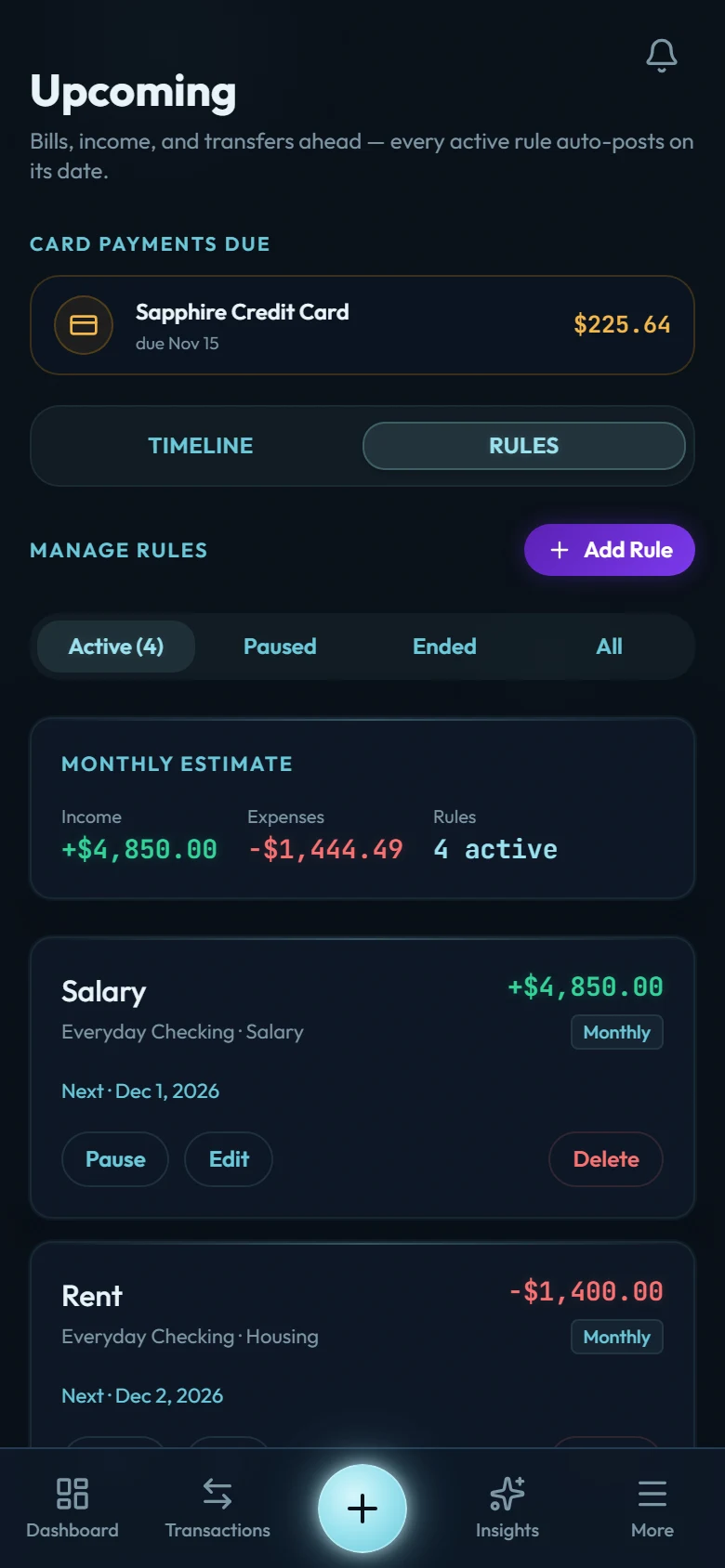
In Wealth Mutant, anything that repeats can be a recurring rule. Go to More, then Upcoming, then the Rules tab. Every rule there has 3 buttons. Pause holds it, so nothing more posts until you resume it: use it for a subscription you have just cancelled. Edit sets an End Date, for a plan that runs until a date you know: the last entry posts on or before it, and the rule then shows under Ended. Delete removes the rule and keeps the entries it already posted.
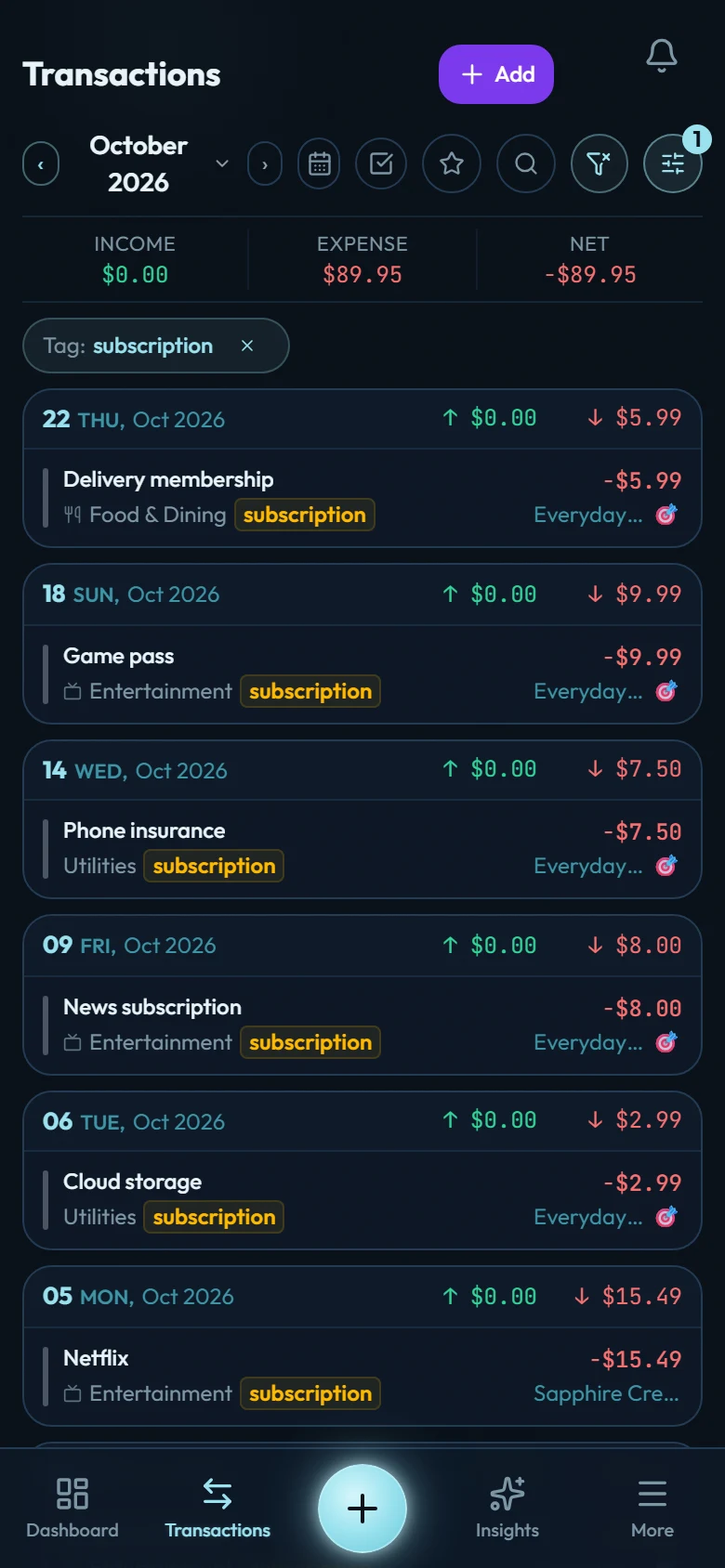
Then look for the charge itself. Give each subscription you record the tag subscription, and one filter by tag lists every one of them for the dates you choose, with their expense total above the rows. Entries a rule posts carry no tags, so add the tag by hand or with bulk edit. Next month, when you note your charges, the one you cancelled should not be among them. If it is, you have the date and the amount to take back to the company or your card company.
What are your rights to cancel a subscription in the US and UK?
The rules in both countries are changing, so the dates matter. All of this was checked on 9 November 2026.
In the United States, the federal rule known as "click-to-cancel" is not in force. The Federal Trade Commission (FTC) adopted one in 2024, but on 8 July 2025 a federal appeals court, the 8th Circuit, struck it down (the legal word is "vacated"). On 12 February 2026 the FTC put back the older rule it had replaced, which covers only "prenotification" plans such as a book-of-the-month club. In March 2026 it asked for public comment on whether to change that rule, and a notice it published on 14 October 2026 still treats that older rule as the one in force.
For a subscription you signed up for online, the main federal protection today is the Restore Online Shoppers' Confidence Act (ROSCA). Per the FTC, an online seller may not charge you under a plan that renews until you stop it unless it explains the terms first, gets your express informed consent and "provides simple mechanisms for the consumer to stop recurring charges". The FTC also says marketers "must not impede the effective operation of promised cancellation procedures". Some states add rules of their own, and the FTC gives California, Colorado, Vermont and Virginia as examples.
In the United Kingdom, the new subscription rules in the Digital Markets, Competition and Consumers Act 2024 are not in force yet. The government's draft guidance, published on 19 October 2026, says they will apply to subscriptions taken out on or after 1 January 2027, if Parliament approves the detailed regulations. Subscriptions you already have stay under today's rules.
For a new subscription, the business will have to remind you before a free or discounted trial ends, before a renewal of 12 months or more, and every 6 months on a weekly or monthly plan. Ending it must be straightforward, and possible online if you signed up online. You also get a new 14-day cooling-off period, time to cancel without penalty, after a trial ends and after any renewal of 12 months or more. Energy, water, phone and broadband, insurance and other financial products are among the contracts left out. If a company will not stop today, use the card and Direct Debit routes above.
Common questions
How do I cancel a subscription I can't find?
Cancel where it is billed. On an iPhone, search your email for “receipt from Apple” or “invoice from Apple”. On Android, try each Google Account you use. In PayPal, look under Automatic Payments. If none lists it, check your statement for the company billing you and cancel with that company.
Does deleting the app cancel the subscription?
No. Google Play's help page says: “When you uninstall the app, your subscription won't cancel.” Cancel in the place that bills you first.
Do I get a refund when I cancel?
On Google Play, you keep the subscription for the time you have already paid for, and the page adds: “In some instances, you may be eligible for a refund.” For a charge taken after you cancelled, go to the company first, then your card company. In the UK, a recurring card payment taken after you cancelled it counts as unauthorised, and your card company must refund it, the FCA says.
Can my card company cancel a subscription for me?
It can stop the payments; ending the subscription is still between you and the company. In the UK, your card company must stop a recurring card payment once you ask, though the FCA says that does not necessarily end your contract. In the US, it can take a dispute, and some, such as Capital One, can block a recurring charge for 12 months or pass a cancellation request to participating merchants, but a block does not cancel the subscription.
Pick the subscription you would miss least and cancel it today. Then give the ones you keep a place you will see: add each as a recurring rule in Wealth Mutant, and the Timeline shows what is about to charge. If your subscriptions grew as your pay did, lifestyle creep explains where the raise went, and the tour shows the budgets and net worth those charges feed into.