If you want a Quicken alternative that you pay for once, this page puts the two side by side. We make one of them: Wealth Mutant, a personal finance app with no yearly membership. Every fact about Quicken here comes from quicken.com and Quicken's own support pages, checked on 25 October 2026.
Inside the app
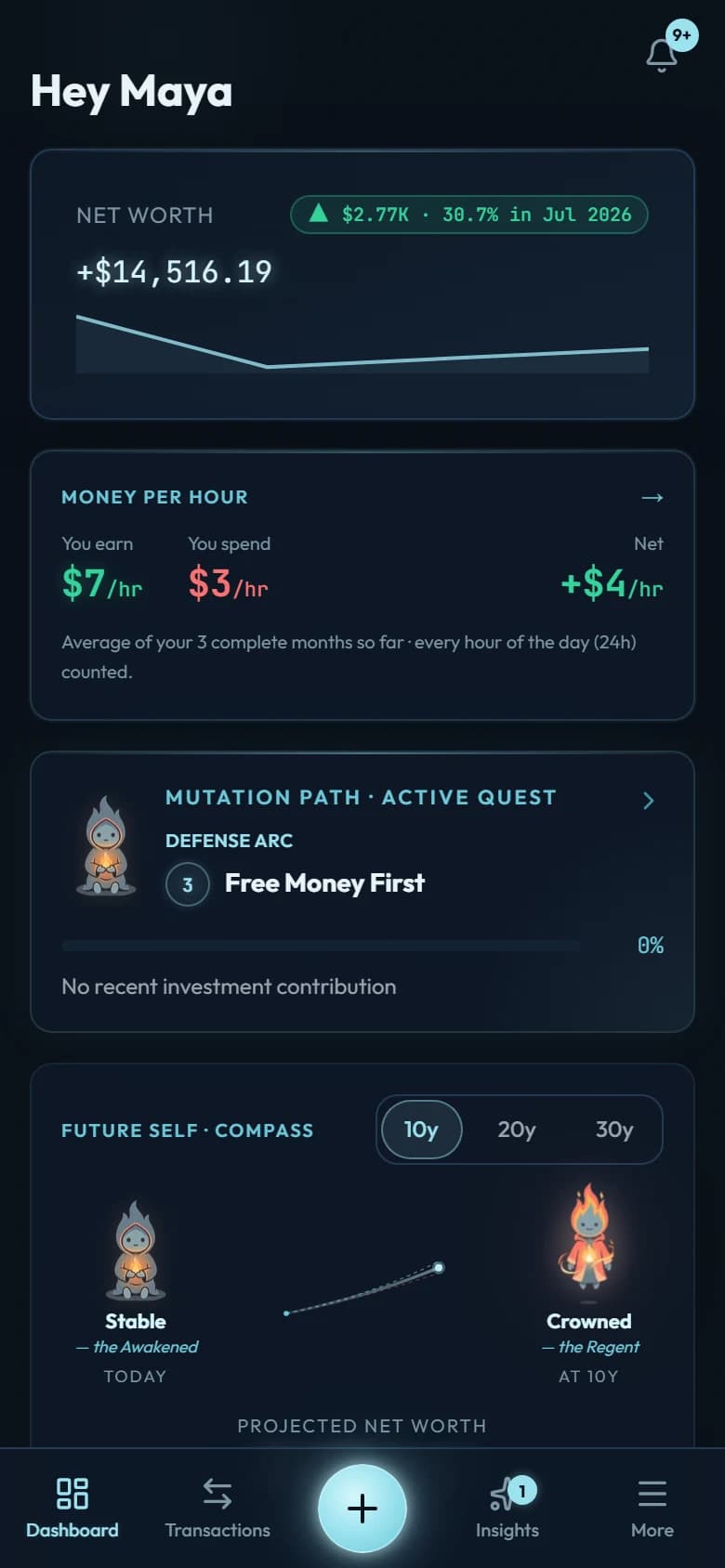
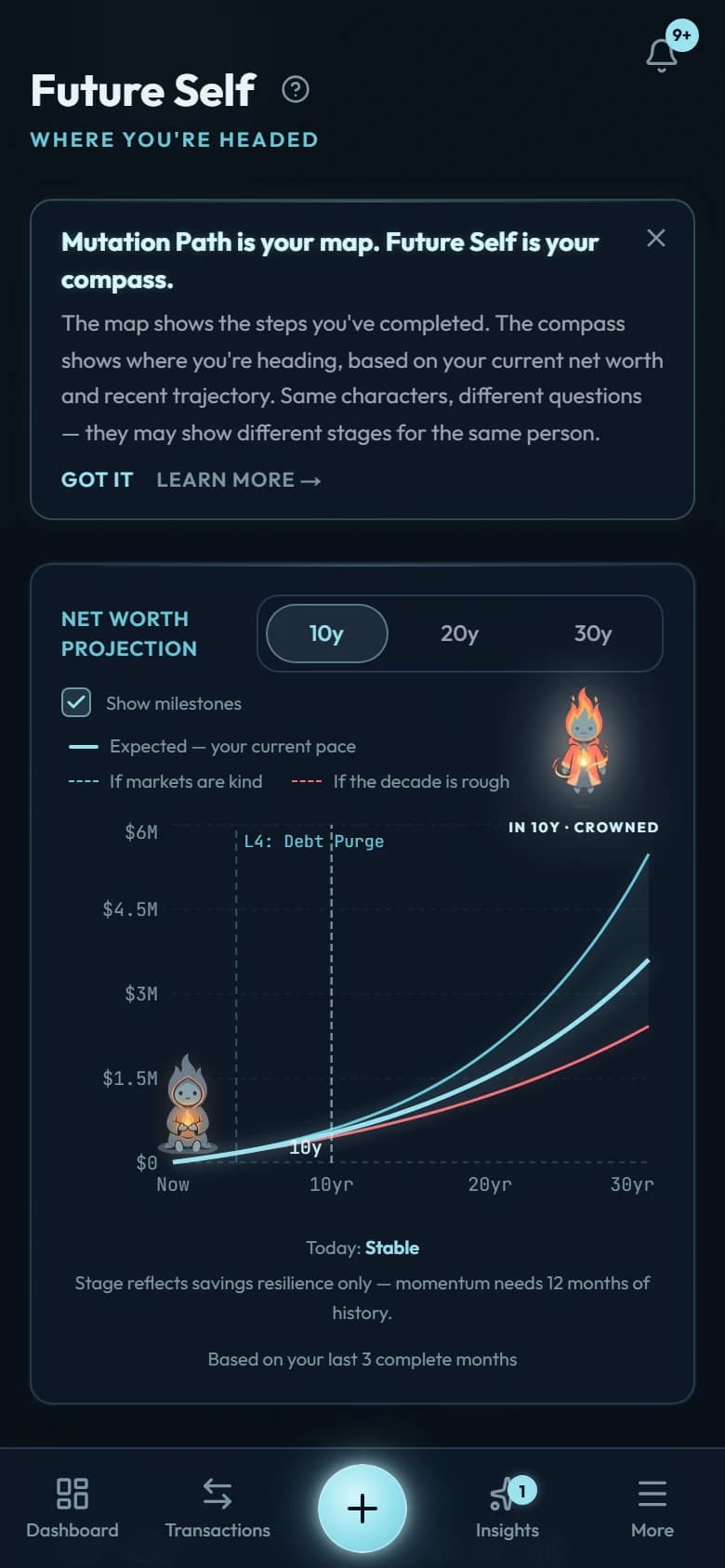
Both give you one picture of your money. Wealth Mutant shows your budgets, every card and loan, and your net worth, then where your current pace leads 10, 20 and 30 years out. A 9-level path runs through it, from knowing your numbers to not needing to work.
The big difference is how the numbers get in, and you should know it before anything else. Quicken downloads your transactions from your banks. Wealth Mutant does not connect to any bank: you record each purchase yourself, which takes a few seconds. That small daily moment is the idea behind Kakeibo, the Japanese habit of writing down every purchase, and it is what makes you notice where your money goes. When life gets busy and you fall behind, you download a statement from your bank and the app adds only what's missing.
Quicken and Wealth Mutant, side by side
Quicken's column uses Quicken's own words where it can. Prices are as quicken.com showed them on 25 October 2026.
| Wealth Mutant | Quicken Classic | |
|---|---|---|
| How spending gets in | You record it yourself in a few seconds; a bank statement fills any gap | Downloads from your accounts: "Connection to over 14,000 Financial Institutions" |
| Investments | Each account's money in and out, and its value as you update it | "Track all your investments from stocks to mutual funds, and more" |
| Paying bills | Bills that repeat post on their own dates; the app never moves money | "Schedule and make payments easily with BillPay" |
| Where your data lives | Stored encrypted on our servers and synced to every device you use | "Your data stored locally" on your computer |
| Platforms | Installs from the browser on Android, iPhone, iPad and your computer; no app store | Windows and Mac desktop software, plus a mobile companion app |
| Price | One payment (see pricing) | A membership billed every year (prices below) |
| If you stop paying | Nothing to stop: you keep using it | You keep your data; downloads, bill pay and updates stop |
| Cards and loans | Each card's statement day and due day; each loan's schedule, with a prepayment simulator | Accounts downloaded from your lenders |
| Reports | Snapshot, Trends, Multi-year and Per hour, under Insights | "Pre-built reports to help monitor all your finances" |
| Your data out | Transactions as CSV, or everything as a ZIP | QIF, an Excel report, or Quicken's own transfer file |
| Best for | The whole picture from what you record, paid for once | Every account and investment downloaded automatically |
Where Quicken is the better choice
If you want every account to fill itself in, Quicken does that and Wealth Mutant never will. It connects to more than 14,000 financial institutions, and it can pay your bills from inside the app with BillPay.
Investors get more from it too. Quicken tracks stocks and funds with their prices. Wealth Mutant records the money you put into an investment and take out, and you update its value yourself.
Quicken Classic also keeps your file on your own computer. Wealth Mutant keeps your entries on our servers, encrypted, so the same numbers are on your phone and your laptop. If having the file on your own machine matters most to you, that is a real reason to stay.
Where Wealth Mutant is the better choice
If you want to stop paying every year. Quicken's pricing pages list only memberships billed once a year, and they say a membership renews "at the then-current rates". You buy Wealth Mutant one time and keep it, with core updates included for as long as the app exists.
If you want to know where it all leads. Net worth is the first number on your dashboard. Future Self shows where your current pace takes it over the next 10, 20 and 30 years. On the Mutation Path, the app reads your own numbers, tells you which of 9 levels you're on, and shows what the next one asks of you.
If you want each card and loan worked out for you. Every card knows its statement day and its due day, so you see what's been billed and when it's due. Every loan carries its schedule, and the prepayment simulator shows what paying extra would save.
If you'd like to notice every purchase. Recording one takes a few seconds: tap +, type the amount, pick a category. Bookmarks fill in the purchases you repeat in 2 taps. And when a busy month gets away from you, catch up from a statement: upload the CSV your bank gives you, and only the missing entries come in. Nothing links to your bank, so you never hand a bank password to anyone.
What Quicken costs
On 25 October 2026, quicken.com priced Quicken Classic in the US at $6.99 a month for Deluxe, $7.99 for Premier and $10.99 for Business & Personal, each "billed annually" as a first-year offer for new memberships ordered by 22 November 2026. After the first year, a membership renews "at the then-current rates". In Canada the page showed Starter at $4.49 a month, Deluxe at $6.99 and Home & Business at $9.99, also billed annually.
Wealth Mutant is one payment, with nothing to renew. The price for your country is on our pricing page, and the refund policy and the terms have the details.
If you stop paying for Quicken
Quicken's support page promises that "you'll still have full access to and ownership of your data" after a membership ends, on Deluxe and the plans above it. What stops, in its words: online bill pay, "Downloading and/or importing financial data", downloading stock quotes, Live Support and software updates. The Starter version "will become read-only".
So leaving Quicken doesn't cost you your history. You can export it whenever you like, before or after you stop paying.
Bringing your Quicken history over
On Windows, it takes one export from Quicken and one import here, with your AI assistant doing the conversion in between.
Export your history from Quicken
In Quicken for Windows, open the File menu, choose File Export, then QIF file, pick the account and the dates, and save. Quicken can also export a report: in Reports, open the Reports & Graphs Center, show the report, then choose Export to Excel Worksheet.
Let your AI assistant convert it
Copy the conversion prompt from Wealth Mutant's import page and paste it, with your Quicken file, into the AI chat you normally use. It asks you one question first, what each account shows today, then hands back the filled-in workbook.
Check the preview, then import
The preview shows each account's ending balance before anything is saved. Import, and your accounts and transactions arrive together. Duplicates are skipped, and for 30 days you can undo the whole import.
On a Mac, Quicken's help describes one export: a Quicken Transfer File (QXF), Quicken's own format for moving data into another copy of Quicken. We couldn't confirm a spreadsheet export for Quicken for Mac. If your copy can export a transactions report, that file works through the same three steps. If it can't, start from today: enter what each account shows now, and your history keeps building from there.
Budgets and saved rules don't come across, so you set those up fresh. The template workbook guide has every detail.
Wealth Mutant is the personal finance app we built for people who want the whole picture without paying for it every year. It brings your budgets, cards, loans and net worth into one place and shows where they lead. You note each purchase yourself in a few seconds, a small daily habit that makes you notice, and no bank login is ever shared. You pay for it once.
Own your money picture, without a yearly membership.
Budgets, cards, loans and net worth in one place, filled in by you in seconds. One payment, and every core update is included for as long as the app exists.
or try it free for 7 days · no card neededBuying after a trial is final; buying without one has a 7-day refund.
Walk the tour to see every screen before you decide. If you are also weighing YNAB or Monarch, all our comparisons are side by side.