
How to make a budget comes down to 5 steps: know your take-home pay, list your fixed bills, see what you really spend, give every amount a job or a limit, and check it once a week. A budget is a plan for how you will spend and save. It works best on figures from your own records.
If you have never made one, this is a normal place to start. If you have made several that did not last, look hard at step 3, the one that is easiest to skip. Below: the 5 steps with a worked example, then how to pick a method, plan for known bills, budget on an irregular income and fix month 2.
How do you make a budget in 5 steps?
Know your take-home pay
Use the amount that lands in your account after tax and other deductions, not the salary on paper. The US Consumer Financial Protection Bureau (CFPB) defines this as net income, also called take-home pay, and says to build a budget on it. If your pay changes every month, the irregular income section below shows which number to use.
List your fixed bills
Rent or mortgage, loan payments, utilities, phone, insurance, subscriptions: the costs that arrive on a date and cost about the same each time. Turn yearly bills into a monthly share. Insurance of 600 a year is 50 a month.
See what you really spend
Before you set a single limit, write down every purchase for a month. The CFPB's monthly budget tool asks for at least 1 month of tracked income and spending first, and Canada's Financial Consumer Agency (FCAC) suggests 1 or 2. Without this step, every limit you set is a guess.
Give every amount a job or a limit
Take-home pay, minus fixed bills, minus what you really spend, leaves a number. Give that number jobs: savings, a buffer, a goal. For the categories you want to watch, such as groceries or eating out, set a limit based on last month's real figure.
Check it once a week
It takes 5 minutes: what is left in each limit, and what is due this week? At month end, compare the plan with what happened and adjust it, as the FCAC advises.
A worked example
These are invented numbers in dollars. Read them in your own currency: the sums work the same. Take-home pay is 3,200 a month, and a month of tracked spending (step 3) gave the figures in the second block.
| Step | Item | Per month |
|---|---|---|
| 2 | Rent | 1,150 |
| 2 | Utilities and phone | 210 |
| 2 | Transit pass | 90 |
| 2 | Insurance (600 a year) | 50 |
| 2 | Loan payment | 180 |
| 2 | Subscriptions | 40 |
| 2 | Fixed bills in all | 1,720 |
| 3 | Groceries | 420 |
| 3 | Eating out | 160 |
| 3 | Household and personal | 110 |
| 3 | Fun | 120 |
| 3 | Everything else | 90 |
| 3 | Real spending in all | 900 |
| 4 | Left to give a job: 3,200 − 1,720 − 900 | 580 |
Step 4 then gives the 580 its jobs: 250 to a buffer for emergencies, 120 for yearly costs that are not monthly (gifts, repairs), 150 to a goal, and 60 left loose for the month the numbers are off. 250 + 120 + 150 + 60 = 580, so every dollar of the 3,200 has a place.
Make your first budget from your own numbers
When you set a category limit, the app shows your average spending there from past months, worked out from the purchases you note.
No card needed.
Which budgeting method should you choose?
The 5 steps work under every method. The method decides how closely you manage step 4. Pick by the attention you will really give, and start one notch simpler than you think you need.
Zero-based budgeting plans all of your take-home pay before the month begins, until the amount left to plan is zero, so overspending in one place means taking from another on purpose. It asks for a weekly session and suits tight money and big goals. Zero-based budgeting, explained gently shows a full month.
The needs, wants and savings split sorts take-home pay into 3 piles by percentage. It is a quick first map that takes almost no upkeep, and its fixed shares fit few real rents. Read when the percentage rule works and when it misleads before you lean on it.
Envelope budgeting gives each kind of spending a fixed amount, and empty means stop. Cash envelopes get harder as fewer places take cash, so the envelope system without the cash keeps the idea with a live amount left in each category.
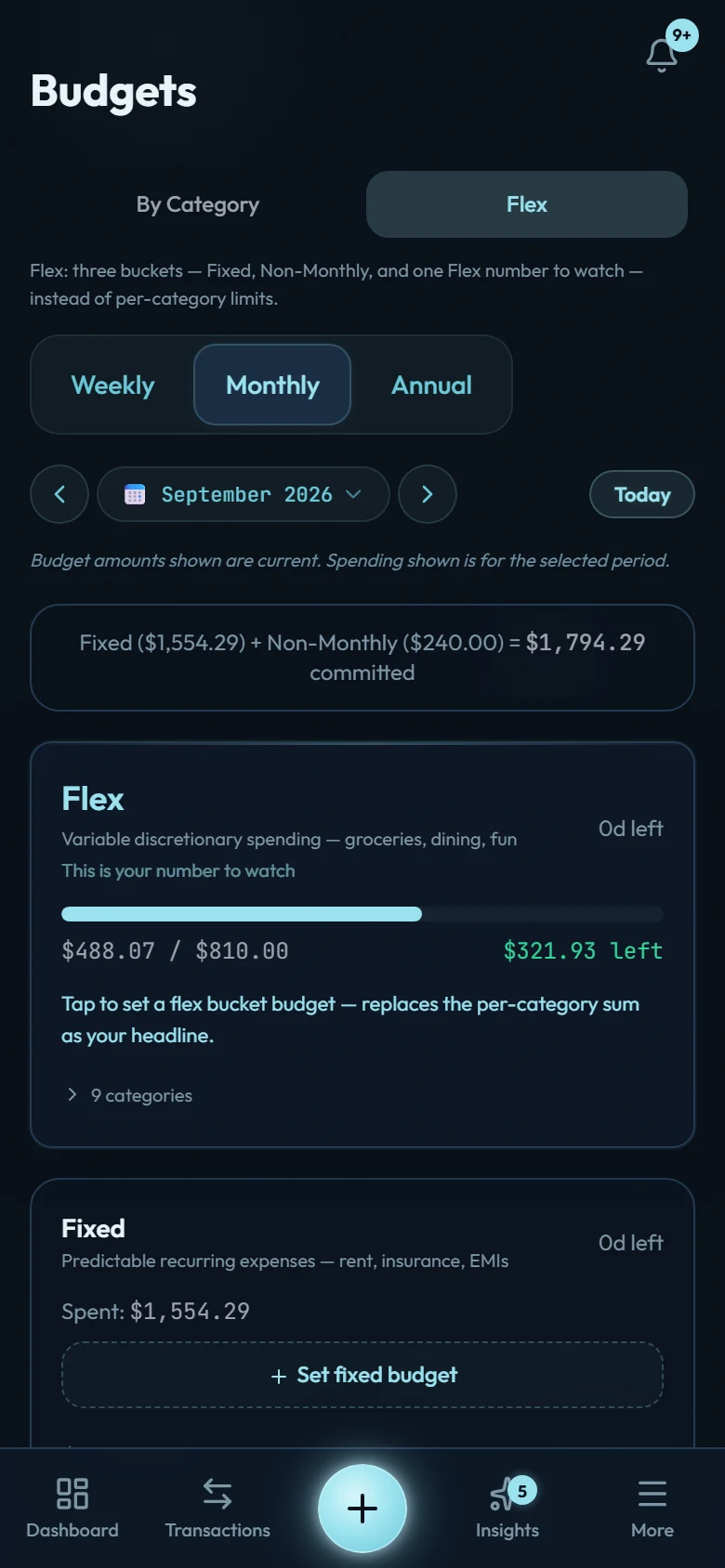
Flex budgeting sorts every category into one of 3 buckets, Fixed, Non-Monthly or Flex, and you watch one number: what is left in Flex. It is the lightest method that still limits spending, and the Flex budgeting guide explains the setup.

The map adds 2 more. Classic category limits, one monthly limit for each category you watch, sit in the middle on both questions, and they are what step 4 sets up. No budget at all means recording what you spend and moving your savings out on payday: a minute or so most days, and no limits.
You can mix methods. One way is Flex as the main view, with one envelope-style limit on the category that keeps getting away from you.
What about known bills and a buffer?
Two kinds of cost wreck a budget that looks fine on paper.
The first is the bill you could see coming but gave no share of your pay: car insurance, school fees, gifts, repairs. Divide each by the months left and put that amount in the budget every month. What are sinking funds covers the sum and where to keep the money.
The second is the cost nobody could see coming. A buffer takes care of it, and Canada's FCAC says an emergency fund should cover living expenses for 3 to 6 months, starting with a small amount on a regular basis. How much emergency fund you need works out your own target. For the sum on your own costs, the emergency fund calculator is free: it gives 1, 3 and 6 months of your essentials and the month you would reach each.
Wealth Mutant is the personal finance app we built for exactly this. It includes budgets, per category or as 3 Flex buckets, alongside your cards and loans, your net worth (what you own minus what you owe) and your goals, so the plan from step 4 sits with the rest of your money. You note each purchase yourself in a few seconds, a daily habit in the spirit of Kakeibo that makes you notice where the money goes, and no bank login is ever shared. You pay for it once.
See the plan beside your cards, loans and goals
Budgets by category or as Flex buckets, with your accounts and net worth kept up to date by what you record, in one personal finance app.
Buy — $99 onceIn the app's Flex view, the Non-Monthly bucket is made for the first kind of cost. Repairs, gifts and annual fees share it, and you can give it a monthly budget of its own.
How do you make a budget on an irregular income?
If you freelance, drive for an app, earn commission or work seasonally, step 1 has no single answer. One method handles it: budget on a baseline month and pay yourself a steady amount.
Canada's Office of the Superintendent of Bankruptcy says to include only income you are confident you will receive, because overestimating it can easily lead to overspending. It also encourages saving in higher-income months to cover lower ones. Both ideas fit one setup:
Find your baseline month
Look back over the last 6 to 12 months of what came in. Your baseline is your lowest realistic month. Say your lowest was 1,800 and a typical month was 3,000: the baseline is 1,800.
Send every payment to a holding account
Client payments and payouts, the big months and the empty ones, all land in one account that is not your everyday account.
Pay yourself the same amount on the same day
On a fixed date, move your baseline from the holding account to your everyday account. Run the 5 steps on that amount, which is now a salary you know.
Set tax money aside the day a payment lands
When you work for yourself, tax is often not taken out of what you are paid, so move your share into its own account as each payment arrives. The table below gives the due dates for the US, the UK and Canada. How much to keep depends on your own tax, so take that figure from your tax office or an accountant.
Let good months fill the buffer first
When the holding account holds 2 months of salary (3,600 in the example), send extra to your emergency fund, then to whatever is next on your list. Raise your salary rarely, and only after the holding account has shown it can pay the higher amount.
| Where you pay tax | What the tax office says |
|---|---|
| US | "If you are in business for yourself, you generally need to make estimated tax payments," says the IRS. The year is split into 4 payment periods, each with its own due date. |
| UK | Pay your Self Assessment bill by 31 January. If last year's tax was £1,000 or more, you usually also make 2 payments on account, payments towards your next bill, by 31 January and 31 July. |
| Canada | You may have to pay tax instalments if your net tax owing is more than $3,000 ($1,800 in Quebec) for the year and for either of the 2 years before. They are due by 15 March, 15 June, 15 September and 15 December. |
In Wealth Mutant you can keep the holding, everyday and tax accounts side by side and record the monthly salary move as a recurring transfer that posts itself on its date. Your bank still has to move the real money, so set the same scheduled transfer there. The freelancers page walks through the whole setup.
What do you do in month 2, when your budget breaks?
If you followed step 3, month 2 is the first month your limits meet real spending. A category runs over, or a bill lands before your pay does.
A bill that lands before your pay is a timing problem. The CFPB's bill calendar puts your bills and your paydays on one page, so you can see how they line up. If one week has more bills than income, it suggests asking to change some due dates.
What to change:
- Limits that were guesses. Reset them to last month's real figure. In Wealth Mutant, when you create a budget and pick its category, the app shows your monthly average there from up to 3 recent full months, with a button to use it.
- Bills you forgot. Add them to step 2 with their monthly share.
- Money between categories. Moving 40 from eating out to groceries on purpose is the budget working, as why your budget fails by the 15th explains.
- Bill dates. If rent is due 5 days before payday, set it aside from the pay before, or ask whether the due date can move.
What to keep, and what to avoid:
Do
- Keep recording every purchase, including the ones that went over.
- Keep the savings line. Fix the category that ran over instead.
- Review once a month and adjust the figures to match your real life.
Don't
- Throw the whole budget out because 1 category broke.
- Raise every limit at once so the red bars go away.
- Read an overspend as a mark against you. It is information for next month.
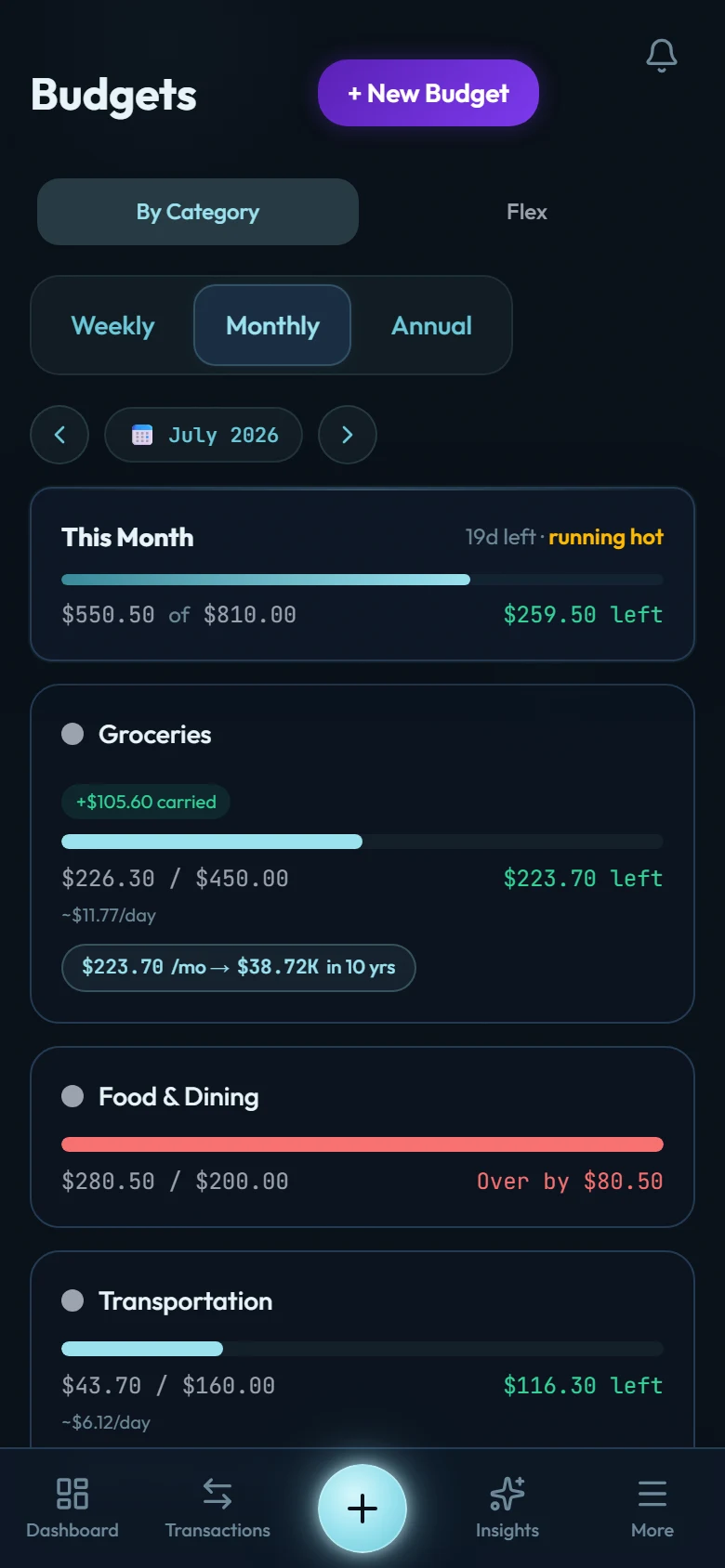
Rollover is optional and set one budget at a time: unspent money carries into next month, and you choose whether an overspend is forgiven or carried. The app can also send you an alert when a budget passes 80% and again at 100%. Budgets, two ways and the rollover guide have the details.
What changes once you have a budget
"Can I afford this?" gets an answer you can look up: what is left in that limit. A surprise stops being a crisis, because the buffer and the yearly costs already have their share.

Common questions
How long does it take to make a budget?
The setup is an evening: your take-home pay, your fixed bills and your goals. The step that takes time is the month of tracking your real spending, which the CFPB and the FCAC both suggest before you set limits. You can start the tracking today and finish the budget next month.
What if my bills are more than my income?
The CFPB's guidance is plain: if your expenses are more than your income, look at the budget to find expenses to cut. Start with the flexible categories, and with fixed bills you can renegotiate or cancel, such as subscriptions. The budget will show you the size of the gap, which is the number you needed.
Is a spreadsheet or an app better for a budget?
Either works if you keep using it. A spreadsheet is free and flexible, and an app does the adding up for you. Pick the one you will open every week.
How do I budget if I get paid weekly or every 2 weeks?
Budget by the month, on the pays that come in every month. Weekly pay comes 4 times in most months and 5 in some, so build on 4 and give the 5th a job when it lands. Pay every 2 weeks comes twice in most months and 3 times in a couple, so build on 2. Pay each fixed bill from the pay before its due date, so no bill lands before the money does.
Your next step
Start step 3 tonight: record today's purchases, a few seconds each. If a first week on paper feels easier, try a 7-day money diary.
In a month, set your first limits from those real figures, and check them on the same day each week. The tour shows where budgets sit in the app.
If the money still runs out before payday, living paycheck to paycheck covers the order to fix it in.